Reporting Fake Google Reviews in 2026
A lot has changed since the world’s biggest search engine first introduced its review functionality several years ago, and as the service has grown, so has the need to report fake Google reviews.
Today, online reviews are more important than ever. A recent Trustpilot study found that up to 90 percent of people now read reviews before making a buying decision.
Many dedicated review platforms now exist, including Trustpilot, Google, and the BBB (better known as the Better Business Bureau). Most importantly, all of your online reviews can heavily impact your reputation score.
However, by far the biggest and most widely accessed review website isn’t actually a review website at all — it’s Google Search itself.
In our guide to dealing with fake reviews, you’ll learn how to report fake reviews and remove suspicious reviews once and for all.
We can help you spot fake Google reviews, remove them, and create a positive online reputation. Call us at 941-259-4554 for more information.
Google Reviews Dominate the Consumer Review Industry
Countless Google reviews now pop up front and center when searching for brands and businesses of all sizes online. Google also collates reviews from elsewhere around the web and shows these at the same time.
BrightLocal found that Google is the most-used website for reviews, followed by Facebook, Yelp, and Tripadvisor. Plus, the “sort by newest” feature on Google reviews is the most useful according to 47% of consumers.
As such, for many businesses, a glowing star rating on Google is crucial. It’s quite often the first thing that potential customers see when searching for a company or brand, and those ratings work as social proof alongside customer feedback and genuine reviews.
Unfortunately, this has led to a massive increase in fake reviews. Phony, bogus, false, fake – call them what you like, but the fact is that there’s more shady behavior on Google than ever when it comes to reviews.
However, there’s some good news: Reporting fake Google reviews couldn’t be easier. Anyone can report what they believe to be a fake review by simply flagging it as inappropriate. But Google generally won’t remove a post just because it’s negative; the review violates removal standards only if it violates Google policies, is not relevant, or otherwise breaks Google policies.
That said, successfully removing fake reviews from Google sites and apps is another story altogether.
How To Handle Fake Reviews on Google (and More Review Tips)

Here, we’ll explain exactly how to go about reporting fraudulent reviews, and we’ll also clarify the following:
- Why fake reviews exist
- What counts as a fake Google review
- Why review fraud is a problem
- Where negative Google reviews come from
- What to do if a review removal request is denied
- How to reply to these Google reviews
We’ll also touch on the impact of fake Google reviews and how they affect your business and online reputation. This information may not make you an expert on fake Google reviews, but it will inform your approach for reporting and removing fake reviews on Google.
Our clients come to us when they need to combat fake reviews online. Call us at 941-259-4554 to learn more.
Reporting Fake Google Reviews
Google reviews are most prominent on search engine results pages (SERPs) and Google Maps, and you can flag them directly in Google Search or Maps. Thankfully, the process for reporting fake reviews is incredibly straightforward:
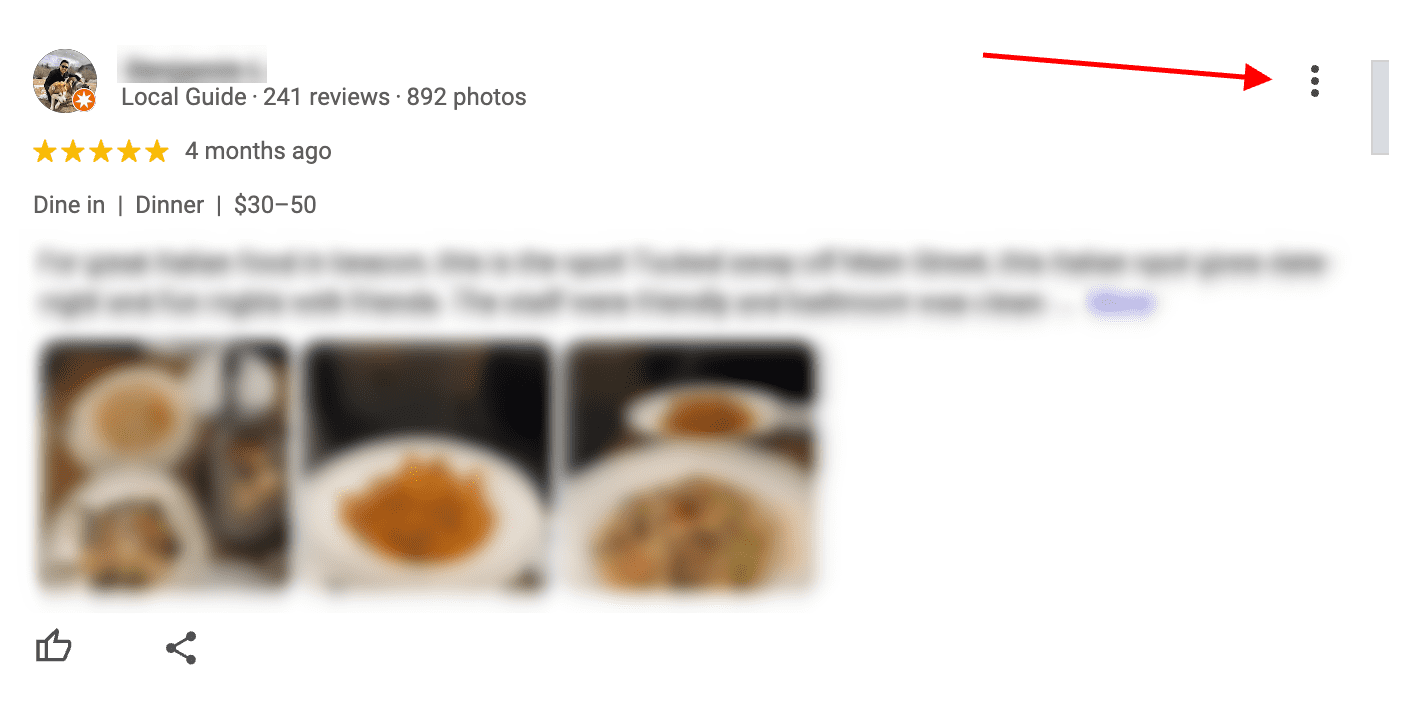
When you find a fake review, click the Three Dots icon to the right of it. Before reporting, save screenshots and other clear evidence.
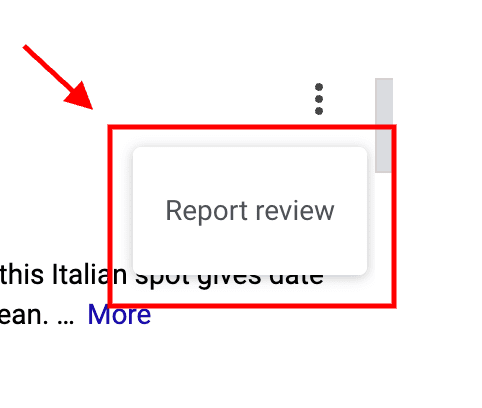
Then, click Report Review on the small menu that pops up.
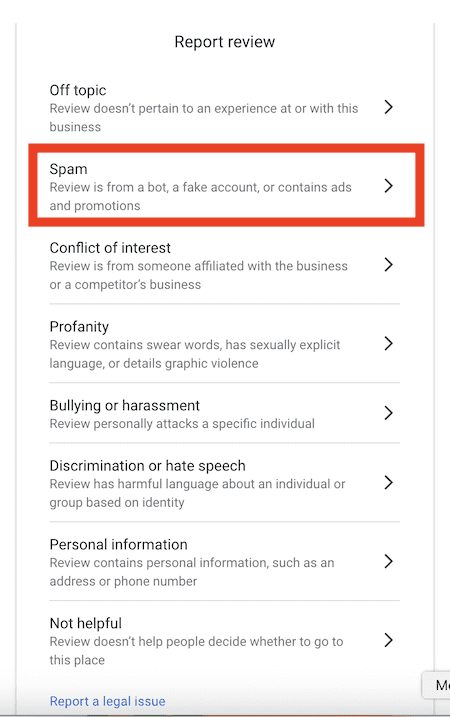
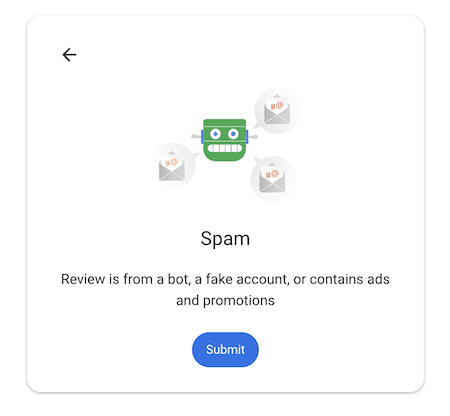
Next, select the reason that best matches the policy violations and explains why the review violates Google policies, rather than choosing Spam automatically in every case. The description says, “Review is from a bot, a fake account, or contains ads and promotions.”
Click Submit to send the report to Google. Reviews flagged for policy violations may be removed.
Google will only use your email address to reach out for additional details if needed. Furthermore, Google won’t share your contact information with the reviewer or the business to which the review relates.
In many cases, review checks take several days or up to seven business days. While waiting, you may only hear from Google if they need more information. If, after that, a previously flagged review remains visible, business owners may need to contact Google directly for help. You can also reach out through Google Support. To monitor status, use the Reviews Management Tool, especially if you’re tracking a new review pattern or submitting multiple reports.
Business owners can flag inappropriate or fake reviews for any company they own or manage on the Google Business Profile (GBP) platform. If you’re trying to remove fake reviews tied to repeated attacks or incentivized behavior, Google also offers broader reporting options. If a request does not qualify for removal, the business owner can appeal.
Why Do Fake Google Reviews Exist?
Generally, fake Google reviews come from disgruntled customers and unscrupulous competitors. Such schemes can trigger legal action, and the FTC banned all fake reviews on August 14, 2024.
The latter is becoming increasingly prevalent. Unscrupulous competitors may often attempt to discredit your business with bad reviews or fake reviews on Google.
They may also do this to multiple competitors. To bolster their own rating, they may also post fake positive reviews for their own business. Legal consequences can include fines up to $51,744. If you face review attacks or extortion, Google advises you not to pay.
What Counts as a Fake Google Review?
A fake review is any review that doesn’t reflect a real customer experience or isn’t relevant to the business or transaction described. People post fake reviews to discredit a business or influence Google’s star ratings.
Either way, the means of reporting such reviews to Google are the same. Reviews tied to fake accounts or containing inappropriate content may also be reportable. Simply flag them as inappropriate and mark them as spam. In repeated cases of clear policy abuse, you can also report user profiles.
Why Are Fake Google Reviews a Problem?

Fake Google reviews are an issue for many of the same reasons that any kind of phony review is problematic:
- Fake Google reviews are liable to confuse or misinform clients, customers, and other individuals, and they can shape how potential customers decide whom to trust.
- They’re used to discredit businesses that do not deserve to be discredited.
- Fake Google reviews are used to influence how the search engine giant displays business listings, in part because reviews act as social proof.
If your Google Business profile is compromised by negative reviews, your business’s reputation is at risk.
Ultimately, a higher GBP rating means a better ranking on Google. Similarly, a poor rating can cause a business to fall by the wayside. This is particularly troublesome when competitors attack businesses with fake one-star reviews to push them down the rankings, though a stronger base of genuine reviews and customer feedback can help offset some of the damage.
Where Do Fake Google Reviews Come From?
Fake Google reviews most commonly stem from disgruntled customers and competing businesses. In some cases, suspicious reviews come from several people acting together in a coordinated attack. They may also come from angry former employees, as well as friends and family members of the business or a competing business.
Anyone seeking revenge can attempt to post a fake review to paint you or your business in a negative light.
Sometimes, inexplicable one-star reviews may appear without any rhyme or reason whatsoever. This may be a case of mistaken identity, where an individual actually reviewed the wrong business. While these aren’t technically fake, you may still flag them as inappropriate and report them to Google. Some campaigns also rely on review gating or incentivized requests, which are policy violations rather than authentic feedback.
What To Do if a Removal Request Is Denied
Google denies numerous removal requests every day.
For example, if a customer leaves a genuine one-star review after a poor experience, Google generally does not remove negative reviews just because they are negative. Since it reflects the truth, it’s in Google’s best interest to leave it up.
Since there are legitimate negative and positive Google reviews, the search engine must decide whether a flagged review is real or fake and act accordingly.
Google uses an automated system to detect spam and fake reviews and determine the validity of reviews. Google removes reviews that violate its content policies when the evidence supports removal. Still, a legitimate removal request will occasionally be denied in error. In this instance, you can appeal and escalate through Google support so Google will reconsider removing it.
Replying to Fake Google Reviews

Where a removal request is denied, your next best option is to respond to the fabricated feedback.
Remember, these aren’t simply negative reviews; these are reviews that contain fabricated or misleading information — and may have been written by someone who has never been a customer. Over time, publishing more genuine reviews can help reduce the impact.
This can help highlight fake reviews to other customers. Potential customers often compare review patterns across platforms. Unfortunately, it does nothing to mitigate the impact of a low-star rating on the overall score.
If you reply to a fake review, be polite and matter-of-fact, and don’t let emotion take over. An angry or aggressive response may only serve to paint your business in a poor light.
As a business owner, keep requesting genuine reviews and customer feedback rather than trying to manipulate the process.
Are you concerned about the impact of fake Google reviews on your reputation or the reputation of your business? Internet Reputation can help. Contact our team of experts at 941-259-4554 to learn more.
Last updated 07/2026