How to Delete a Glassdoor Review and Protect Your Company’s Reputation
If you’re wondering how to delete a Glassdoor review, you’ve come to the right place. This article discusses removing unwanted Glassdoor reviews and managing your company’s online reputation on Glassdoor.
Glassdoor is a popular platform for job-seekers to learn about company culture and employee experiences. Approximately 70% of job-seekers look for additional company information after reading a job post.
Unfortunately, many companies face scrutiny through and because of online reviews. This makes it crucial to handle negative feedback effectively, as it can influence potential customers and candidates. Otherwise, you could miss out on candidates who’d be an excellent fit for your brand, and protecting your reputation takes ongoing time and energy.
This article explores the importance of Glassdoor reviews, offers guidance on managing negative reviews, and provides tips for protecting your company’s reputation on the platform.
We can help you create a positive online reputation, even if you’re starting from zero or rebounding from reputational damage. Call us at 941-259-4554 for more information about removing harmful reviews on Glassdoor.
What Is Glassdoor?
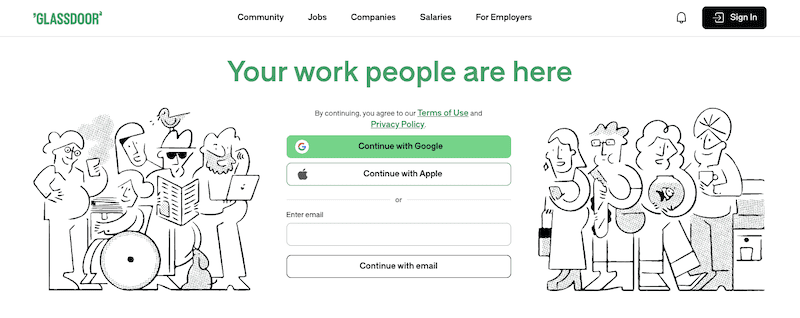
Glassdoor allows current and former employees to anonymously review companies, offering insights into work environments, management, and culture. This transparency helps job seekers make informed decisions and holds companies accountable for employee content about salaries, benefits, and interview experiences.
Approximately 70% of job seekers consult Glassdoor reviews when searching for jobs. Moreover, detailed reviews shape opinions and can influence whether a company can hire top talent.
Positive reviews attract top talent, while negative feedback can harm a company’s reputation and recruitment efforts. Thus, it encourages firms to prioritize employee satisfaction and a positive workplace.
Why Are Reviews on Glassdoor Important for Companies?

Glassdoor reviews are crucial for companies because they influence the brand’s reputation, the image that others form of management teams, and which potential hires are available, yet it can be impossible to judge the truth of some anonymous reviews at a glance.
Positive reviews build trust and attract talent, while negative feedback can harm the brand, affect recruitment, and cause top talent to avoid companies targeted by malicious posts. Poor reviews can also affect the public: 64% of consumers stop buying from a brand after learning the company treats employees poorly, and the long-term effects can hurt business performance through wasted resources and lost revenue tied to poor hiring decisions.
Management should promptly address reviews, demonstrating a commitment to employee satisfaction. Transparent communication and proactive feedback management help improve employer branding and maintain a positive online reputation.
Our clients come to us when they need to build or repair their online reputation and take control of their digital presence. Call us at 941-259-4554 to learn more about how to remove Glassdoor reviews.
What Are the Steps to Delete Glassdoor Reviews?
What happens if your company gets negative feedback on Glassdoor? Here’s how to respond and potentially remove the bad review so it doesn’t impact your brand reputation:
Respond to Negative Glassdoor Reviews
The first step in handling a negative review on Glassdoor is to respond professionally and show that the company values all types of feedback. 71% of Glassdoor users view an employer more favorably when the employer responds to a review.
Maintain a constructive tone, acknowledge the reviewer’s perspective, and express genuine concern. Address specific issues authentically, apologize for negative experiences, and offer to discuss the issue further offline.
This transparency builds trust and demonstrates a commitment to improvement.
Flag Defamatory Glassdoor Reviews
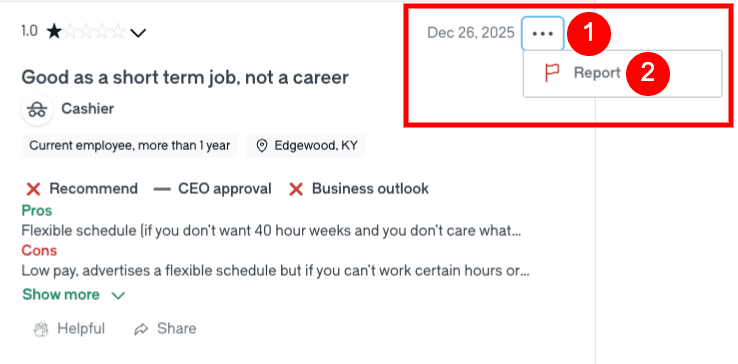
Reviews should contain accurate information and not include hate speech, threats, harassment, or discrimination. If a review appears false, defamatory, or posted by a competitor, flag it to Glassdoor for review on the site.
Go to the review and click the Three-Line Menu Button on the top right. Click the Red Flag Icon that says Report.
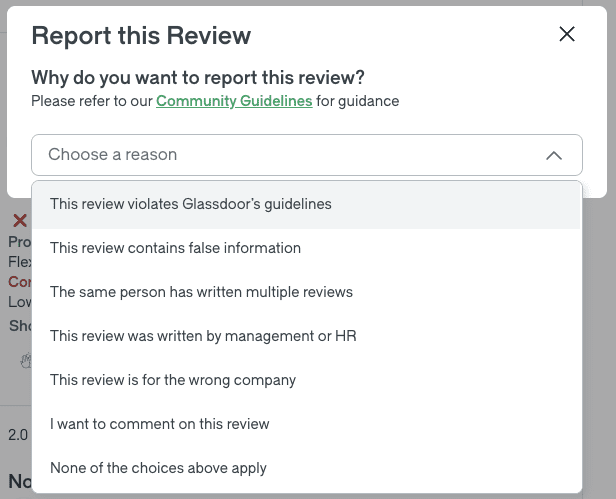
In the pop-up box, select the “Choose a Reason” drop-down menu. Select the reason for reporting the review.
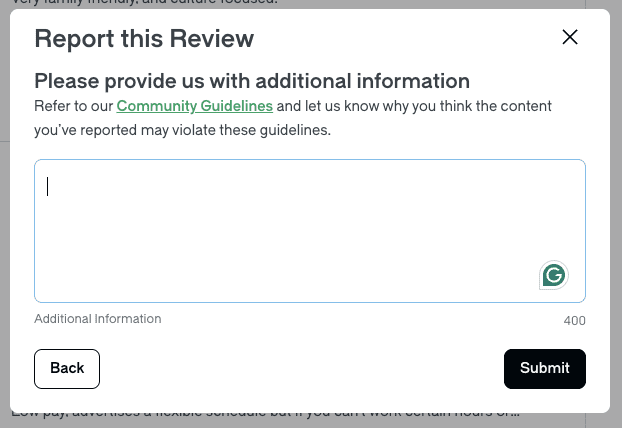
Enter additional information about your reason for flagging the review. When you’re done, click Submit. After a report is submitted, Glassdoor may contact the user for clarification or verification.
Glassdoor evaluates flagged reviews for removal through a moderation process that checks the content against community guidelines and applicable laws before deciding whether to remove them.
Contact Support To Delete Glassdoor Reviews
If flagging a review does not result in its removal, contact Glassdoor’s support team as part of the formal process to seek review removal, and include evidence of guideline violations. Glassdoor may respond to a removal request within 10–15 days, but the overall process can take up to 60 days because repeated submissions or appeals are sometimes required. Clearly outline why the review should be taken down, providing documentation or screenshots. Maintain a professional and courteous tone to positively influence the outcome. Support may ask for more information, and delays can be longer during periods of high request volume.
Contact the Legal Team To Request Deletion of Negative Glassdoor Reviews
As a last resort, request deletion of particularly defamatory reviews from Glassdoor’s legal team, as legal requests can engage their team when a review appears unlawful or clearly false. Gather relevant evidence and clearly outline the reasons for the deletion request, highlighting inaccuracies or slanderous content. Your submission should be accompanied by documentation strong enough to support further review. This is a serious course of action due to potential complications from legal involvement, but successful requests may result in the content being removed completely.
What Are Alternatives to Deleting Reviews From Glassdoor?

Instead of deleting negative reviews, companies cannot always remove every post, comment, or review, so they can manage their reputation on Glassdoor by encouraging positive reviews, addressing complaints, utilizing the employer response feature, and improving company culture.
Encouraging satisfied employees to leave positive comments can offset negative feedback and address specific complaints, demonstrating management’s willingness to listen and improve.
Additionally, improving company culture through open communication and professional development opportunities fosters a positive work environment, leading to more positive reviews and a better overall reputation on Glassdoor.
Get started with a free online reputation analysis by calling 941-259-4554 today. We can help you remove negative Glassdoor reviews and protect your reputation when direct removal is not possible.
How Can Companies Protect Their Reputation From Negative Reviews on Glassdoor?

Companies can protect their reputation on Glassdoor by implementing proactive strategies such as regularly monitoring and responding to reviews, using an employer account and company profile to track feedback and respond strategically on the website, encouraging employee feedback, addressing negative reviews professionally, and utilizing Glassdoor’s employer tools and resources.
- Regularly monitoring and responding to reviews helps companies stay informed about employee sentiments and address issues promptly, enhancing transparency and engagement.
- Encouraging open and honest employee feedback through anonymous surveys and one-on-one meetings fosters a culture of continuous improvement.
- Addressing negative reviews empathetically and providing context demonstrates a commitment to resolving issues, which also helps protect recruitment efforts, as candidates often rely on Glassdoor when deciding where to apply.
Utilizing Glassdoor’s employer tools and resources helps employers manage the company page, improve profile visibility, and understand review trends.
Do you need to speak with an expert about removing negative reviews on Glassdoor? Get in touch with us by calling 941-259-4554 today.